
How Do You Engineer Retail Displays for Easy Installation?
Last Updated: October 24, 2026
Quick Summary
You engineer retail displays for easy installation by using one connector family per system, physically keyed parts that only fit one way, tight tolerances, a capped unique part count, and components one person can lift and place alone. Crating by assembly sequence and testing a full mock build before shipping confirm the design works.
Measure door widths and freight entry points before approving any display footprint.
Build displays in three zones: signage on top, hero products at eye level, bulk below.
Number every crate and pack hardware in labeled bags per sub-assembly.
Run a mock assembly in the shop and fix any step needing force or improvisation before shipping.
Choose aluminum extrusion frames and CNC-cut plywood for light, repeatable fits.
Table of Contents
Why Installation Engineering Decides Whether Your Retail Display Succeeds
Start With the Store: Layout, Traffic Flow, and Display Placement
Reading the Store Before You Draw Anything
Designing for Shopper Psychology and Product Visibility
Visual Hierarchy: Height, Depth, and Hero-Product Placement
Modular Retail Display Design: Build Once, Deploy Everywhere
The Engineering Rules That Make Modular Actually Easy
Modularity and the Rollout Math
Retail Fixture Installation Best Practices: From Crating to Sign-Off
Packaging and Unboxing Design
Installation Instructions and Visual Documentation
Measurable Acceptance Criteria Before the Truck Leaves
Safety, Stability, and Compliance
Materials, Fixtures, and Finishes That Make Assembly Simple
Testing, Safety, and Acceptance Criteria Before the Truck Leaves
Send Us Your Rendering and We'll Engineer the Install
Frequently Asked Questions
Why Installation Engineering Decides Whether Your Retail Display Succeeds
A retail display that takes four hours to install costs you four hours of lost selling time in every store. That is the part most design decks skip. Engineering retail displays for easy installation is not a finishing detail. It decides whether a rollout stays on schedule or stalls in the back room.
Retail display installation engineering is the practice of designing fixtures, connections, and packaging so a store team can assemble them correctly, safely, and repeatably without specialized tools. It covers everything from bracket design to crate labeling.
Below, we break down the full process: reading the store, designing for shoppers, building modular systems, and testing before anything ships.
Start With the Store: Layout, Traffic Flow, and Display Placement
Design begins in the store, not on a screen. Store layout, traffic flow, and fixture placement determine what your display must do before you draw a single panel.
Reading the Store Before You Draw Anything
Walk the space first. Note where shoppers enter, where they slow down, and where staff need clear paths. A few things to record:
Primary and secondary traffic flow lines
Existing gondolas, shelving, and display racks
Power locations for lighting
That last item matters more than most teams expect. If the crate cannot fit through the back door, the design fails before installation starts. Measuring access routes before approving any footprint is crucial.
Designing for Shopper Psychology and Product Visibility
Shopper behavior follows predictable patterns, and product visibility drives sales performance. Design for how people actually shop, not how you wish they would.
Breakthrough Productions
Most shoppers scan at eye level first, then work down and out. That is your visual hierarchy at work.
Visual Hierarchy: Height, Depth, and Hero-Product Placement
Build the display around three zones:
Top: brand signage and visual interest, seen from a distance
Middle: hero products at natural eye level, the easiest place to reach
Bottom: bulk, backup stock, or secondary items
Display depth matters too. Shallow shelves near the aisle invite product discovery and customer interaction. Deep shelves push product back and hide it.
A common mistake is treating every product as a hero. Pick one or two. Let the rest support them.
Modular Retail Display Design: Build Once, Deploy Everywhere
Modular retail display design uses standardized, interchangeable components so one system fits many store footprints. It is the single biggest lever for cutting installation time and labor costs across a rollout, but only if the engineering behind it is disciplined. Modularity is not a look.
Modularity pays off in four places:
Fewer unique parts to track and ship
Repeatable assembly across stores
Easier reconfiguration as assortments change
For a closer look at how modular systems perform across retail deployments, see our breakdown of modular shop-in-shop displays.
The Engineering Rules That Make Modular Actually Easy
Most "modular" systems fail on site for predictable reasons.
One connector family per system. Pick a single connection method, cam locks, tool-free clip connectors, or keyed aluminum extrusion joints, and use it everywhere.
Hold tolerances tight enough to repeat. CNC-cut panels and milled connector plates should fit without force on the first try and on the fiftieth.
Cap the unique part count. Every distinct part is a part that can be lost, mislabeled, or shipped to the wrong store.
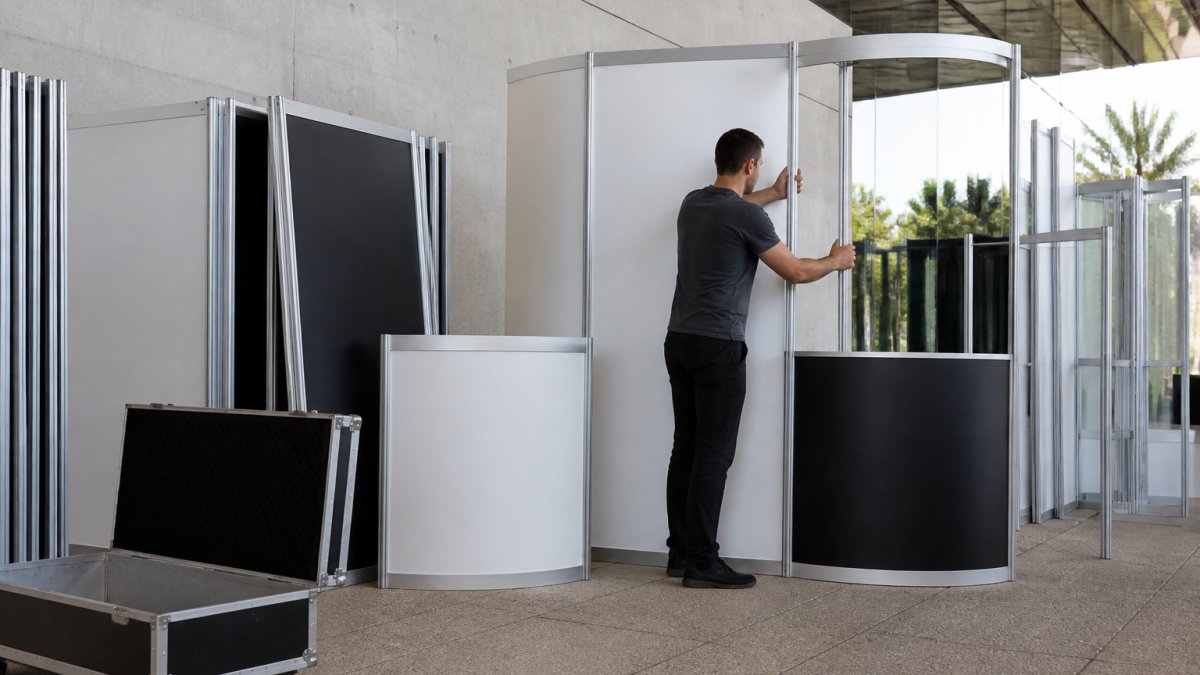
Design for one person. If a component needs two people or a ladder to place, it will slow every install and create a safety exposure. Break large panels into manageable sections, keep single-piece weights within what one associate can safely lift and position, and put heavy or awkward pieces at the base of the assembly sequence.
Pro Tip A useful test at the design review: can one person, working alone with the listed tools, assemble the display in the target time without referring to the instructions more than once? If not, the design is not done.
Modularity and the Rollout Math
Modular systems change the economics of a multi-store rollout because the same engineering is reused store after store. The savings show up in freight (flatter packs, fewer crates), labor (shorter install windows, fewer crew hours), and reuse (structures that come back and go out again instead of being scrapped). The design decisions that produce those savings are made early, connector choice, part consolidation, and packaging, and they are hard to retrofit later.
Retail Fixture Installation Best Practices: From Crating to Sign-Off
Retail fixture installation best practices start long before the truck arrives. They start with how you crate, label, and document the build, and they end with a written sign-off that tells the store team, and you, that the display is installed correctly.

Packaging and Unboxing Design
Packaging is part of the product. If parts arrive mixed or unlabeled, store staff lose time sorting and guess. Crating by assembly sequence, not by size, is often effective.
Number every crate to match the instructions
Pack hardware in labeled bags per sub-assembly
Include a printed parts list inside the lid
Good unboxing design means a staff member opens crate one and knows exactly what to do first. Flat-pack dimensions matter too: a crate sized to the door opening and the freight elevator saves a fight at the loading dock, and a crate that stacks and palletizes cleanly saves freight cost across a rollout.
Installation Instructions and Visual Documentation
Instructions are where most easy-install promises die. Write them for the person actually building the display, often a store associate with no fabrication background, working in a busy aisle.
Use large, clear diagrams with numbered steps that match the crate and part labels
Number every part and every fastener so the diagram and the hardware agree
Link a short assembly video by QR code on the parts list and inside the crate lid
Watch Out The most common installation error is not a hard step, it is a skipped step. Numbered, visual, sequence-matched instructions catch skipped steps before the display is half-built and has to come apart.
Measurable Acceptance Criteria Before the Truck Leaves
A display is not done when it looks right. It is done when it passes a test, and the test should produce numbers, not opinions.
Check | What It Confirms | Pass Criteria |
Mock assembly | All parts fit without force | Zero rework needed; assembly completed within the target time by one person |
Stability test | Display holds under load | No wobble or tipping under expected shelf load |
Tool check | Install matches tool list | Only listed tools required; no specialty tools |
Anchor check | Secure anchoring to wall or floor | All anchor points engaged and torqued to spec |
Labeling check | Crates match instructions | Every part accounted for; no orphan hardware |
Repeatability check | Second and third builds match the first | Same time and same result on repeat assembly |
Track assembly time and error count on the mock build. If the first build takes longer than the target, or if any step required force or improvisation, the design or the instructions get fixed before anything ships, not after a store calls to say it does not fit.
Safety, Stability, and Compliance
Safety and compliance belong in the same checklist as fit and finish. Confirm that anchoring meets the requirements of the space where the display will sit, that display materials meet applicable fire and material requirements for the occupancy, and that egress paths stay clear.
Store staff usability matters too. If a fixture needs a ladder and two people to restock, it will not get restocked.
For a deeper guide to fit-up testing and preventing installation failures, read our article on preventing installation failures in custom fabrication.
Materials, Fixtures, and Finishes That Make Assembly Simple
Material choice drives assembly speed. The right materials reduce weight, part count, and tool needs at the same time.
What works in practice:
Aluminum extrusion for frames: light, strong, and tool-friendly
CNC-cut plywood and millwork for shelving and counters: precise, repeatable fits
Cam locks and tool-free connectors for panels that come apart and go back together
What causes trouble: heavy solid-surface panels that need two people and a lift, and finishes that chip the moment a crate is dropped.
Watch out: mixing connector types across a system is the fastest way to create assembly errors on site. Standardize early.
Testing, Safety, and Acceptance Criteria Before the Truck Leaves
A display is not done when it looks right. It is done when it passes a test.
We run a full mock assembly in the shop before shipping.
Check | What It Confirms | Pass Criteria |
Mock assembly | All parts fit without force | Zero rework needed |
Stability test | Display holds under load | No wobble or tipping |
Tool check | Install matches tool list | Only listed tools required |
Anchor check | Secure anchoring to wall or floor | All anchor points engaged |
Labeling check | Crates match instructions | Every part accounted for |
For a deeper guide to fit-up testing and preventing installation failures, read our article on preventing installation failures in custom fabrication.
Safety and compliance belong in the same checklist. Check local fire codes for display materials, confirm anchoring meets the venue's requirements, and keep egress paths clear.
Send Us Your Rendering and We'll Engineer the Install
The gap between a beautiful rendering and a display that installs cleanly in every store is engineering. That gap is where we work.
If you are moving from design into fabrication and install, our guide to retail design project management from brainstorm to execution walks through the full sequence. Compare alternatives to standard pop-up retail displays.
Already have a rendering? Send it over. See our experiential production work for brands and companies, then let's talk about what you are trying to accomplish.
Frequently Asked Questions
What are the most common installation challenges for retail displays?
The recurring problems are missing or mislabeled hardware, parts that don't align because tolerances were never checked, unclear instructions, and displays that need two people but arrive with one installer. Freight damage from weak crating adds to it. Most of these are decided at the design stage, not on site. Engineering retail displays with tool-free connections, labeled components, and a test build before shipping removes the majority of on-site surprises.
How does modular retail display design affect installation costs?
Modular retail display design splits a large fixture into repeatable sections that one or two people can handle without lifts or specialty labor. That reduces installation hours, the number of crew members needed, and freight volume, since panels nest and ship flat. It also lets you replace a single damaged section instead of rebuilding the whole unit. The savings compound across a multi-store rollout, where the same assembly sequence repeats in every location.
What materials work best for lightweight, durable retail displays?
Aluminum extrusion for frames, plywood or MDF with a durable laminate for panels, and acrylic or PETG for graphics and product risers cover most retail fixtures. Aluminum keeps weight down without giving up strength, which matters when one person has to lift a section into place. For shelving, specify the load rating and check it against the actual product weight. Finish choices should survive repeated assembly, so avoid edges that chip when panels are handled.
How do you balance complex design with simple assembly requirements?
Keep the visual complexity in the graphics, lighting, and finish, and keep the structure simple. A display can look intricate while assembling from a small number of identical connections. Designers should define the assembly sequence early, then have fabrication build a prototype and time the install. If a step needs a specialist tool or more than two people, redesign it. That approach protects the creative idea without turning setup into a project of its own.
Your display has a deadline and a store team waiting on it. The difference between a smooth rollout and a back-room pile of parts is engineering decided months earlier. Breakthrough Productions brings design, fabrication, logistics, and installation together, so your fixture arrives labeled, fits the first time, and installs without a specialist on site. Get started with Breakthrough Productions and turn your rendering into a display that survives the loading dock.
LET'S START SOMETHING AMAZING
Add breakthroughproductions.net as a preferred source on Google →


Comments